Thursday, 2 June 2016

Eclipse Static imports


There are two preferences that work together to enable this feature. The first one just needs verification:
  1. Go to Window > Preferences > Java > Editor > Content Assist.
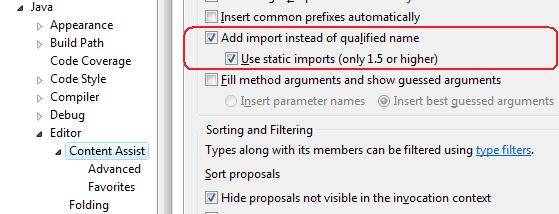
  2. Make sure the option Use static imports (only 1.5 or higher) is enabled (it should be enabled by default, but it’s good to verify this anyway).
Here’s an example of how it should look:


Next you have to tell Eclipse which classes you’d like to add as static imports. Here’s how to do this:
  1. Go to Window > Preferences > Java > Editor > Content Assist > Favorites.
  2. Click New Type. This brings up a dialog where you can enter the fully qualified type.
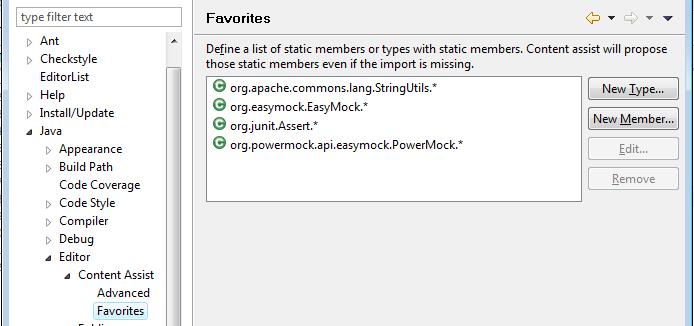
  3. Enter org.junit.Assert and click Ok (you could also use the Browse… if you want to search for the type). Eclipse will add an entry to the list which reads org.junit.Assert.*.
  4. Click Ok on the preferences dialog to save and close the preferences.
Here’s what my list currently looks like:

You can add an entry for any other static import you’d like, even for a static Utils class you’ve written yourself.
Now, to test that it works you can add a JUnit test, type assertEquals, press Ctrl+Space and press Enter on the appropriate entry. Eclipse will now add the static import org.junit.Assert.assertEquals (or org.junit.Assert.*, depending on your Organize Imports preferences).
As I mentioned before, this only works for autocomplete and not for organise imports commands (eg. Ctrl+Shift+O), but it is already a lot better than having to enter the import yourself and should do the job most of the time.

Camel - Properties Loading using Java And Dynamic Loading of Routes XML


How to read properties from file in Camel Context and use it in anywhere ?

Solution:

I faced difficulty to get this working with camel context. That's why i wanna share with you.

Java version:

1.Load the Properties file and convert as Properties object in java.

2.
Properties props = new Properties();

try (InputStream propBody = IOUtils.toInputStream(body)){

props.loadFromXML(propBody);

} catch (Exception e) {

Logg the error here

}

3.
PropertiesComponent pcomp = new PropertiesComponent();
pc.setOverrideProperties(props);
exchange.getContext().addComponent("properties", pcomp);


Usage in Camel -Spring XML :

<log message="  TEST PROPERTY READ -  ${properties:serverURL}" loggingLevel="DEBUG"

logName="com.mycompnay.log" />


<enrich strategyRef="OrderPurifyStrategy">

<simple>${properties:serverURL}</simple>

</enrich>


Properties File:

serverURL= www.google.com


I used file component from camel to read the file for every change of content in file under "Test" Folder.

<route>
<from uri="file://Test?recursive=true&amp;noop=true&amp;delete=false&amp;runLoggingLevel=TRACE&amp;idempotent=true&amp;idempotentKey=${file:name}-${file:modified}" />
<bean ref="Someclass" method="updatePropertiesFile" />
</route>


Dynamic Loading of Routes Xml in Camel:

String body = body of the file.

try(InputStream is  =IOUtils.toInputStream(body)) {
                RoutesDefinition routes = exchange.getContext().loadRoutesDefinition(is);
                exchange.getContext().addRouteDefinitions(routes.getRoutes());
            } catch (Exception e) {
                logger.error("Error while routes ["+fileName+"]loading .....",e);
            }

you cannot use bean defintion in the same routes.xml, for this bean definition purpose we have to define new xml file with spring beans xml namespace.


Wednesday, 11 May 2016

CORS - Cross Domain-Resource Sharing , Camel Restlet


Hi guys, I have  come  with new one on CORS - HTTP Stuff

CORS means CROSS DOAMIN RESOURCE SHARING

If you develop REST Application and tried testing with Chrome REST or Firefox REST Plugin or addons , it would have worked. But When u try with HTML page using JavaScript it might return with HTP - 405 (Method Not Allowed)

In my case it is issue with Camel - RESTLET. I have the same issue as below :
INFO:         13:10:38        127.0.0.1        -        -        24366        OPTIONS        /ORDER/COMPUTER        -        405        487        0        2        http://127.0.0.1:24366        Mozilla/5.0 (Windows NT 10.0; WOW64; rv:46.0) Gecko/20100101 Firefox/46.0        -

Solution:

Before going to issue you have to understand the CORS concept. As it name says , it is cross domain .

Your code is actually attempting to make a Cross-domain (CORS) request, not an ordinary POST.
That is: Modern browsers will only allow Ajax calls to services in the same domain as the HTML page.
Example: A page in http://www.server.com/index.html can only directly request services that are in http://www.server.com, like http://www.server.com/testservice/etc. If the service is in other domain, the browser won't make the direct call (as you'd expect). Instead, it will try to make a CORS request.
To put it shortly, to perform a CORS request, your browser:
  • Will first send an OPTION request to the target URL
  • And then only if the server response to that OPTION contains the adequate headers (Access-Control-Allow-Origin is one of them) to allow the CORS request, the browse will perform the call (almost exactly the way it would if the HTML page was at the same domain).
    • If the expected headers don't come, the browser simply gives up (like it did to you).


I enabled the CORS for RESTLET in camel.
And also upgraded to Camel 2.17.1, which works well with CORS.Bcoz it doesn't support in earlier version which is less than Camel 2.16.2 .

Reference:

Wednesday, 4 May 2016

JSON <-> MAP Serialization


Problem:
how to convert to JSON to MAP and Vice-versa in java?

Solution:

I used org.json library simple and best for json operations.

//import
import java.util.HashMap;
import java.util.Map;

import org.json.JSONObject;
import org.json.JSONTokener;

long start = System.currentTimeMillis();
        String test = "12333";
        Map<String,String> map = new HashMap<>();
       
        for (int i = 0; i < 10; i++)
        {
            map.put("key"+i, i+test);
        }
        //System.out.println(map);
        long pause1 = System.currentTimeMillis();


        JSONObject json = new JSONObject(map);
        json.toString(4);
       
        long pause2 = System.currentTimeMillis();
        System.out.println("Map 2 JSON---"+(pause2-pause1)+"Millis");
       
         JSONObject object = (JSONObject) new JSONTokener(json.toString()).nextValue();

        object.toString(4);
        long pause3 = System.currentTimeMillis();
       
        System.out.println("JSON to MAP---"+(pause3-pause2)+"Millis");